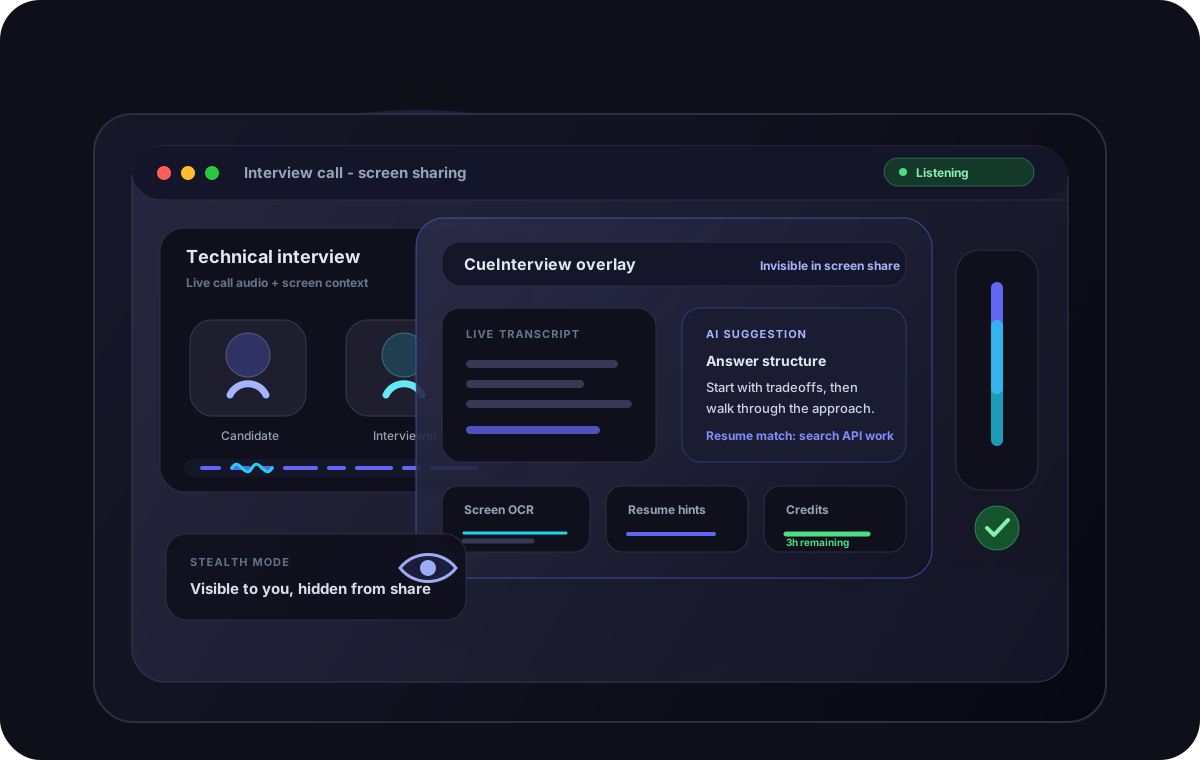
CueInterview helps software engineers answer technical, behavioral, and system design questions with real-time AI assistance tailored to their experience.
Watch how CueInterview transcribes interview questions, provides resume-aware guidance, and helps you deliver confident answers — all in real time.
Purpose-built for software engineers preparing for coding, system design, behavioral, and leadership interviews.
Get assistance for algorithms, data structures, coding discussions, and technical problem solving.
Explain architecture decisions, scalability considerations, and trade-offs more effectively.
Structure stronger responses around communication, leadership, and teamwork.
Prepare for leadership, strategy, stakeholder management, and people management discussions.
Every feature is built from the ground up for technical interview scenarios.
Capture every question accurately during coding and design interviews.
Generate guidance based on your actual experience and achievements.
Get help explaining architecture, coding decisions, and technical concepts.
Create more structured and impactful answers to behavioral questions.
Interview confidently in English and 9 other supported languages.
No complicated setup. Download, activate, and prepare for your next interview.
Install the application on your Apple Silicon Mac.
Allow the AI to understand your experience and background.
Join Zoom, Google Meet, or Microsoft Teams and launch CueInterview.
Get contextual interview assistance based on what the interviewer asks.
Communicate your experience and skills more effectively.
CueInterview is optimized specifically for Apple Silicon Macs to deliver fast performance and low-latency AI assistance during interviews.
Windows support coming soon · Join waitlist
CueInterview is purpose-built for technical interview preparation — not a general-purpose chatbot.
| Capability | CueInterview | Generic AI Chat |
|---|---|---|
| Resume-Aware Guidance | ✓ | — |
| Real-Time Interview Assistance | ✓ | — |
| Technical Interview Focus | ✓ | — |
| Desktop Application | ✓ | — |
| Coding Interview Support | ✓ | — |
| System Design Support | ✓ | — |
| Live Transcription | ✓ | — |
| Screen Context (OCR) | ✓ | — |
Your interview data stays yours. CueInterview is designed with privacy as a core principle.
Your resume information is never shared with third parties.
All communication is protected using industry-standard encryption.
Use your own OpenAI API key through the BYOK plan for complete data control.
No browser extensions required. Runs natively on your Mac.
Downloaded by 500+ engineers and used during real technical interviews.
"CueInterview helped me structure my system design answers during a FAANG interview. The resume-aware suggestions made my experience really shine through."

Senior Software Engineer · San Francisco, United States
"I used it for a Staff Engineer interview round. The real-time transcription meant I never missed a question, and the AI guidance kept my answers focused and relevant."

Staff Engineer · Bengaluru, India
"As an Engineering Manager transitioning roles, the behavioral interview support was invaluable. It helped me frame my leadership experience in a compelling way."

Engineering Manager · Toronto, Canada
"The Indonesian language support helped me prepare answers naturally while keeping my technical explanations clear. It made my backend interview feel much more manageable."

Backend Engineer · Jakarta, Indonesia
1 credit = 1 hour of interview assistance. Credits never expire. We provide the OpenAI key — no setup required.
2 credits · $7.45 each
5 credits · $6.98 each
10 credits · $5.99 each
Secured by PayPal · Credits added instantly after payment
Use your own OpenAI API key for unlimited sessions.
One-time payment, no recurring fees, up to 2 devices.
Prepare smarter. Communicate better. Interview with confidence.
Download the app, activate your license, and prepare for your next interview. Your account works across reinstalls.
First time on Mac? See our Setup Guide for step-by-step instructions.